The Editor
The editor is where a project is authored: entities are spawned, components are attached and tuned, and the result is played back without leaving the window.
It is one program that runs in two arrangements, and the difference matters more than it looks.
Two arrangements, one editor
Embedded — the project’s own binary opens the editor:
cargo run # inside your project directory
The editor runs inside the project, so the project’s components are simply linked in. This is the simplest arrangement and needs no socket, no second process, and nothing to go wrong between them.
Standalone — the editor opens, and you point it at a project:
cargo run -p kooch_editor      # from the engine repo
# then: Open Project
Here the editor is a separate program that does not have your project’s types compiled in. It gets them two ways at once:
- It loads the project’s
dylibto learn what components exist and what fields they have, which is what fills the Add Component menu and the Inspector. - It launches the project as a headless host (
--remote) and drives it over a local socket. That host is where the world actually lives, so a system you wrote runs in its process while you watch the result in the editor’s viewport.
Why the split exists. Rust has no stable ABI, so a pre-built editor cannot simply link a project compiled separately. The
dylibgets around that by requiring the same compiler for both — fine for code the editor itself built. The remote host covers the rest: running your systems against a live world. Seedocs/MEMORY.mdfor the full reasoning.
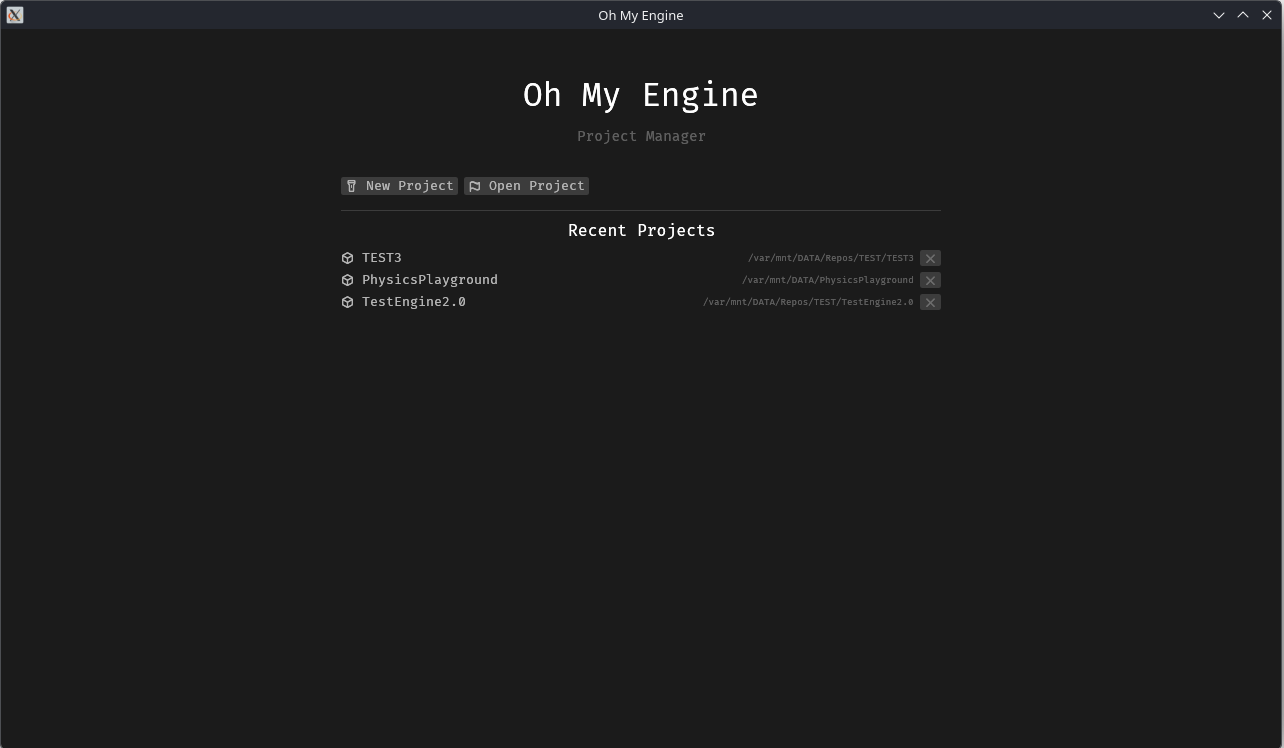
The Hub — the window you get from cargo run -p kooch_editor — is where projects are created
and opened.
The panels
| Panel | What it is for |
|---|---|
| View | The 3D viewport. Selection, transform gizmos, the physics debug overlay, and the meshlet debug-view dropdown. Owns the editor camera. |
| Game | What the game’s own camera sees — no gizmos, no selection outlines. A sibling tab of View, and only rendered while its tab is visible. Play does not switch you here or take the editor camera away; the two views coexist because a frame is a list of views. |
| World | The entity hierarchy of every loaded scene. Selecting here selects in View. |
| Inspector | The selected entity’s components and their fields. Where authoring happens. Hover a field name and its doc comment appears as a tooltip — units included, which is how you find out that a directional light’s intensity is in lux and a point light’s is in lumens. |
| Components | Every component type the engine and your project registered. |
| Archetypes | Which combinations of components actually exist, and how many entities are in each. A debugging view of how the ECS stored your scene. |
| Asset Browser | The project’s assets and the engine’s, as two roots. Right-click a .scene to make it the one the project opens with; that scene carries a ▶ in the tree and its name is in the accent colour. |
| Input Map | Edits a .inputaction asset: bindings, the five composites, processors. An action is an asset, not an entry in a map — see Writing a System. |
| Console | Structured logs from the editor and the launched project, filterable. Text is selectable and copyable. |
| Performance | Frame timings, and per-stage counters where they exist. |
Editing shortcuts
| Chord | What it does |
|---|---|
| Ctrl+Z / Ctrl+Y | Undo / redo the last edit. The Edit menu names the step it would take — Undo Duplicate Entity — so you can see what you are about to reverse. |
| Ctrl+D | Duplicate the selection where it stands. |
| Ctrl+C / Ctrl+V | Copy the selected entities into the editor’s clipboard and paste them as new ones, named Player Copy. What is held is the values, so a copy still pastes after the original is deleted. |
Ctrl+D, Ctrl+C and Ctrl+V act on the entity selection, so they are live only while the World panel or the View has focus. None of the four fire while you are typing in a field: Ctrl+C in the Console copies a log line, and in the Inspector it copies text. Each command is also in the Edit menu and in the World panel’s toolbar, with its chord written beside it — a greyed-out Paste means the clipboard is empty.
Undo follows the document, not the panel
Ctrl+Z undoes an edit to the thing you are looking at. The editor holds several documents open at once, and each keeps its own history:
| What you are editing | What Ctrl+Z reaches |
|---|---|
| The scene (World, View, or the Inspector on an entity) | the project’s world |
| A prefab open in the Inspector | that prefab’s document — one history per prefab |
| A material or an import setting | that asset |
| The input map in its panel | that map |
| The Console, the Asset Browser, the Build panel | nothing at all |
The Edit menu names both the step and the document — Undo Set intensity (this prefab) — so you can see which history you are about to move before you move it.
One stack for the whole editor is the Unity and Unreal model; it fits an editor that holds one
document open, and this one does not. A history per panel would be worse: the Inspector edits
whatever is selected, so its stack would hold edits to three different things. Godot 4 reaches
the same answer — histories keyed by scene, a global one for what belongs to no scene, and a
separate REMOTE_HISTORY for a live-edited remote world, which is exactly the split here.
A continuous edit is one step. Typing Player into a name field emits an edit per
keystroke and dragging a slider emits one per frame; edits to the same field collapse into a
single history entry, closed when you release the mouse or leave the field. Without that the
undo works perfectly and reads as broken — six Ctrl+Z to undo one rename.
Asset files are deliberately not undoable. Renaming, deleting and importing are not in any history: between the operation and the Ctrl+Z there is a filesystem watcher, an importer and whatever else is running, so an undo would be a promise the editor cannot keep. Unity leaves its Project window out of the undo stack for the same reason.
With a project open, undo travels to the project. The editor’s world is a mirror of one the project owns, so a Ctrl+Z is sent as the inverse of the edit that was made — the project applies it, and the mirror catches up on the next refresh. Undoing a despawn brings the whole subtree back with its values, under new entity handles: it is a rebuild, not a resurrection. Loading a scene or closing the project clears the history, because the world it describes is gone.
Play
Play does not rebuild anything and does not open a second window.
Pressing Play snapshots the authored world, flips the Playing gate so gameplay systems
start running, and simulates in the editor’s own viewport. Stop lowers the gate and restores
the snapshot, so the world goes back exactly as authored — you do not lose your scene by
testing it.
#![allow(unused)]
fn main() {
// kooch_remote::handlers::set_playing, in essence
if playing {
    resources.insert(PlaySnapshot(WorldSnapshot::capture(resources)));
    Playing::set(resources, true);
}
// Stop: the gate goes down *before* the restore, so no system
// observes a half-rebuilt world.
Playing::set(resources, false);
if let Some(snapshot) = resources.remove::<PlaySnapshot>() {
    snapshot.0.restore(resources);
}
}
This is why your project’s systems register with run_systems: false while authoring: they
are registered either way and skipped per frame, so Play can flip them on live rather than
recompiling.
Known rough edge. A locally-opened project’s Play button still has an older path that shells out to
cargo run, which builds the project and opens a second window — minutes of nothing, and no snapshot. Tracked in #633. It does now run the game binary, which is what a player would get (#558).
Launch environment
Settings → Launch environment is a line of whitespace-separated
KEY=VALUE that the Play button hands the game, stored against the open
project’s path in the editor’s own config.
It exists because every knob this engine can be measured with is a
KOOCH_* variable — the frame they exist for is a game launched outside
the editor — and Play’s child process inherits the editor’s environment
and nothing else. Without the field, handing a game one variable meant
relaunching the editor with it set.
KOOCH_SHADING_PAD=4 KOOCH_FRAME_METRICS=log
🔴 Stored in editor_config.ron, not in project.kooch. A launch
option is a measurement, and a measurement committed to a repository is a
wrong configuration every collaborator inherits. Per project rather than
one global line, because “it silently applied to the other project too”
is how a capture ends up measuring something nobody asked for.
⚠️ Three variables are the editor’s and override anything typed here:
KOOCH_ENGINE_ROOT and KOOCH_PROJECT_ROOT, which the editor knows and
a text field does not, and KOOCH_LOG_FORMAT=json, without which the
Console cannot parse the game’s output at all — every line would arrive
as one opaque string that has lost the level and target it filters on.
RUST_LOG is the opposite: a default, so a line naming it wins.
No quoting. A value with a space in it would need a shell’s rules, and
these variables are single words; a token that is not a KEY=VALUE pair
is dropped with a warning rather than in silence, and the rest of the
line still applies.
What the editor does not do yet
Honest list, so nothing below is mistaken for a bug in your setup:
- No build button. Changing Rust code means running
cargo buildyourself (#158). - No reload. The project’s
dylibloads once, when the project opens. Seeing a code change means reopening the editor (#648). - No New Scene. Scenes have to exist on disk already (#619).
- Exposure and ambient light have no panel. Both are engine
Resourceswith sane defaults and no way to change them from the editor, so a scene that reads too bright or too flat cannot be corrected without editing code. See Lighting. - Reconnecting discards unsaved changes silently. Relaunching the host reloads the scene from disk; anything not saved is gone, and nothing warns first.